

The individual workflow for responding to a toy compliance notice on Amazon is manageable: open Account Health, find the flagged ASIN, engage an approved TIC lab, wait for results, done. For a seller with five toy listings, this is an operational inconvenience. For a seller with 150 flagged ASINs and an enforcement deadline on each, it is an entirely different problem – one that a manual, one-by-one response will not solve in time.
This article is about that second situation. What to do when the dashboard is showing triple-digit compliance violations, the enforcement windows are already running, and the team responsible for clearing them is also running the rest of the business.
When 100+ ASINs Land in Your Dashboard at Once
Amazon's compliance enforcement does not arrive gradually. For large toy catalogues, it tends to arrive as a block – a significant number of ASINs flagged simultaneously, each carrying its own deadline and its own testing or verification requirement.
Consider a realistic example: a seller with several hundred toy listings across soft toys, outdoor play equipment, and games receives compliance notices on over 150 ASINs in a single enforcement wave. Each ASIN requires individual action. Testing costs alone, at a conservative average of €400 per SKU, represent a six-figure compliance spend. The deadlines start running on the day the notices arrive. And none of this pauses day-to-day marketplace operations.
The most important thing to resist at this stage is the instinct to start at the top of the list and work down. Compliance at scale is a triage and prioritisation problem. Treating it as a sequential task list is how high-revenue listings get suppressed while you are busy clearing low-value ones.
Audit Before You Act: Finding and Categorising Your Exposure
All flagged ASINs are surfaced in Seller Central under Performance → Account Health → Product Policy Compliance. Each row shows the affected ASIN, the at-risk sales figure, the enforcement action pending, and the "Address issue by" deadline.

Account Health → Product Policy Compliance. The at-risk sales figure and enforcement deadline are visible per ASIN. The Submit button opens the TRF and appeal workflow.
The at-risk sales column is your first prioritisation filter. Before you contact a single lab, spend 48 hours building a complete picture. You need three things:
- The full flag list with "Address issue by" dates – export from the Product Policy Compliance view. The date field tells you how much of each window remains.
- A testing classification for each ASIN – either a full re-test is required (no valid ISO 17025-accredited report), document verification is possible (you hold a qualifying report and just need the TIC to verify it), or the ASIN has been incorrectly classified and should go through the appeal workflow instead.
- 90-day revenue per ASIN – pull from Business Reports and merge with your compliance list. The at-risk figure in Account Health gives a baseline; your own revenue data will be more precise and is what should drive prioritisation.
Prioritising by Revenue at Risk vs. Testing Lead Time
With that data in hand, you can segment your flagged ASINs into four buckets, each with a different response:
- High revenue, document verification eligible: Act on day one. Fast clearance at low cost – these are your first calls to TIC providers.
- High revenue, full re-test required: Also act on day one, and engage multiple labs simultaneously to avoid single-provider capacity constraints. These carry the highest consequence of delay and the longest lead time.
- Low revenue, document verification eligible: Batch and process in week two, once high-revenue submissions are confirmed in motion.
- Low revenue, full re-test required: Run the economics before committing. If a listing generates less annual revenue than the cost of recurring annual testing, suppression may be the rational outcome. Archive the ASIN; reactivate if the product becomes significant.
The goal in week one is not to clear all flags. It is to ensure that no high-revenue listing reaches its enforcement deadline before testing has been initiated.
Tactical play: the TRF "In Progress" status
This is the most operationally significant mechanic in Amazon's enforcement system – and it is stated directly in Amazon's TIC services policy:
“Send your product samples or existing test documents. This allows the TIC service provider to update your TRF status to ‘In Progress’ when they receive your submission. While your TRF status is ‘In Progress’, your ASINs will not be enforced.”
At scale, this changes everything about how you prioritise day one. For every high-revenue ASIN facing a full re-test with a 4–6 week turnaround, the immediate priority is not completing the test – it is generating the TRF ID and getting any available documentation into the lab to trigger "In Progress" status. That single action protects the listing from suppression while the proper test cycle runs.
Approved labs are currently handling high submission volumes. That backlog – a problem in other contexts – works in your favour here: it extends the "In Progress" window and gives you the time to complete testing properly rather than under deadline pressure.
The caveat you need to know: Amazon's policy also states that “if your product fails testing or documents fail validation, your products will be enforced immediately.” This mechanism extends the window for compliant testing – it does not suspend the requirement. Your testing programme must produce a passing result within that window.
The Two Paths in Seller Central
When you click Submit on a flagged ASIN in the Product Policy Compliance view, Amazon presents two options:
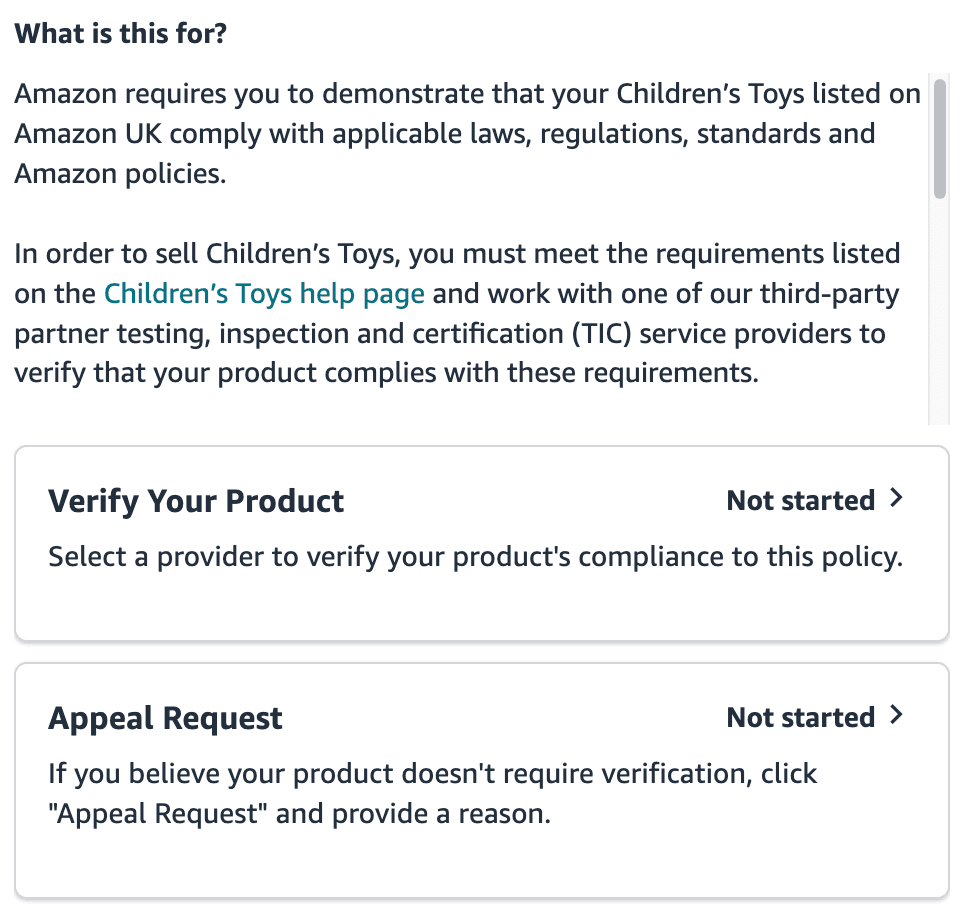
After clicking Submit: "Verify Your Product" initiates the TRF workflow with a TIC provider. "Appeal Request" is for ASINs you believe have been incorrectly classified.
- Verify Your Product – the standard path for confirmed toy ASINs. Select an approved TIC provider, confirm your contact details, and Amazon generates a TRF ID. Provide that ID to the lab and send samples or documents. Once the lab logs receipt, your ASIN moves to "In Progress" and enforcement is paused.
- Appeal Request – for ASINs you believe do not require verification. Select the reason from the dropdown, add supporting context, and submit. Appeals can take several weeks, so initiate them immediately – do not wait until the testing queue is clear.
At scale, both paths run in parallel across different ASIN segments from day one, not sequentially.
Using SP-API to Catch Flags Before They Become Emergencies
The reactive scenario – a compliance wave arriving as a block, with everyone scrambling to respond – is the result of not having visibility into account health data before Amazon surfaces it as a notification. The Selling Partner API (SP-API) provides access to the same compliance data that drives your Account Health dashboard, queryable on your own schedule.
For large-catalogue operators, SP-API integration means compliance flags appear in your operational systems as soon as Amazon registers them – not when the email arrives. The same data layer that surfaces Buy Box losses and listing suppression signals can surface compliance notices early – giving you days or weeks of additional lead time before the enforcement window officially begins.
Relevant SP-API endpoints for compliance monitoring:
- Listings Items API – returns per-ASIN issues including compliance flags and suppression status
- Seller Account Notifications API – webhook-based alerts when account health events occur, enabling near-real-time detection
- Product Type Definitions API – identifies which ASINs fall under toy product type classifications and are therefore in scope for enforcement
Compliance as a Recurring Operating Discipline
Clearing the current wave is not the end state – it is the baseline. Amazon can require re-testing at any time, and renewal expectations mean each cleared ASIN has an effective testing anniversary. Managing this proactively means tracking clearance dates and initiating renewals 60 days ahead of expiry, well before Q3/Q4 lab capacity tightens and queue times extend.
There is also a product change dimension that many catalogues underweight. Any meaningful change in materials, supplier, or manufacturing process can invalidate an existing test report and trigger an out-of-cycle testing requirement. For catalogues with active product development or flexible sourcing, compliance needs to be a checkpoint in the change management process – not something that surfaces later when a notice arrives.
Where Compliance Fits in a Continuous Monitoring System
At the level of sophistication described above – API-connected, alert-driven, prioritised by revenue impact – compliance monitoring is structurally identical to continuous listing optimisation. Same data infrastructure, same triage logic, same principle: a large catalogue cannot be managed through periodic manual checks.
A well-integrated system treats a compliance flag the same way it treats a Buy Box loss or a suppressed listing: as a signal that enters a prioritised queue, gets assigned to the appropriate response workflow, and is tracked through to resolution. Compliance does not get a separate dashboard or a separate team – it gets embedded into the operational system that already manages everything else.
For operators managing large toy catalogues, this integration is the difference between a compliance wave being a managed operational event and a six-figure crisis that surfaces without warning.
Dealing with a compliance wave right now?
If you have a large number of toy ASINs flagged in Account Health and need help scoping the impact, building a prioritisation framework, and setting up monitoring so this doesn't repeat – we can help. We work with large-catalogue operators on exactly this type of systematic response.
Talk to us about your catalogue →For background on the EU toy compliance requirements and the standard TIC process, see Amazon's toy compliance policy, TIC services guidance, and our overview article Amazon Toy Compliance 2026.
The Suitability Scanner is a free catalogue audit that maps your optimization state, identifies your highest-value opportunities, and confirms whether a continuous system is the right fit – before any commitment.
Get the free Suitability Scanner